
Willed Calendar HD4.0.1 - App Store
You'll be able to see results in few seconds.
Publisher Description



Willed Calendar allows you to use the system's calendar and reminders in one app, as well as project management (view progress and add subtasks), event planning, chart summary and other useful features, is a great tool for your management time.
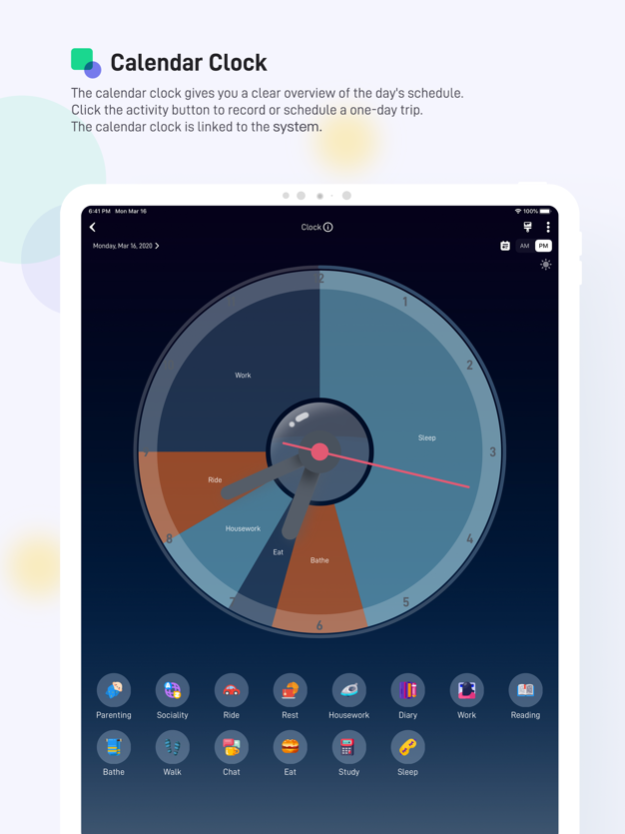
Use the time pie chart to record and display the day schedule on the clock, and record the day's schedule in 30 seconds. The day's schedule is clear at a glance.
Security and privacy, no need to register an account, all data is stored in your iCloud, only you can see, safe and secure.
In order to meet the different needs of more people, the iPhone version and the iPad are sold separately, and the iPad version requires an additional fee. For friends who only need one version, it will be more affordable.
The HD version can be downloaded for free, and all functions can be tried for free within a week. If you feel it is easy to use, you can also purchase and download the iPhone version of Willed Calendar.
【main feature】
◆ Activity record, time pie chart display
You can record or plan your day's schedule in 30 seconds by simply clicking on the preset activity icon.
The pie chart clock gives you a clear overview of the day's schedule.
The innovative handle design allows you to adjust the start and end time of the event directly on the clock, which is simple and convenient.
◆ Current activity timing
Record the current event in one second and know "What am I doing now?"
Innovative time pulley design for quick adjustment of event time.
Can time multiple events in parallel
◆ Task reminder
Sort management task reminders, drag tasks to change reminder time and completion status. Support for displaying task reminders in the form of Gantt charts.
◆ Task management
You can split any thing/item and do it a little bit. The most important thing is that the project has subtask functions and can clearly see the progress of the completion. It can also be copied to the system reminder with one click. Support sharing function. Support for automatic extension of expired tasks. Support Gantt chart and trend chart.
◆ Event plan
An event plan is a schedule that can be copied. After planning a day's activities, you can schedule it for any day or days of calendar. You can also share your own schedule with friends.
◆ Chart analysis
Show all events by day/week/month/year in a variety of charts. There are also time analysis trends such as activity time trends and 24-hour time distribution. Professional chart analysis allows you to see where your time is, master your own efficiency peak hours, and understand your behavior.
◆ Custom wallpaper theme
A lot of super nice background wallpapers have been built, and you can change to your own family/lovers/friends. The wallpaper can be changed easily.
◆ Different clock themes
There are 9 beautiful clock theme colors available, and there is always one and your heart.
◆ Quickly add events on Widgets
You can quickly record the current activity in the widget, which can be displayed on the Widget's beautiful clock.
◆ Physical and mental strength
Calculate your physical strength and brain power through the schedule, for reference only.
◆ Other
◆ You can use the basic functions completely free of charge. You can also try all the advanced functions for free within a week. After the expiration date, you can purchase as needed.
【Customer Support】
◆ Our Sina Weibo
Http://weibo.com/willedcalendar
◆ Our mailbox
Willedteam@gmail.com
◆Vision & Interaction by Dana
◆ Privacy Policy
http://willedcalendarprivacypolicyen.sxl.cn
Jul 21, 2020
Version 4.0.1
——● Update ●——
Full features can be purchased during the trial period
About Willed Calendar HD
The company that develops Willed Calendar HD is 敬宇 李. The latest version released by its developer is 4.0.1.
To install Willed Calendar HD on your iOS device, just click the green Continue To App button above to start the installation process. The app is listed on our website since 2020-07-21 and was downloaded 0 times. We have already checked if the download link is safe, however for your own protection we recommend that you scan the downloaded app with your antivirus. Your antivirus may detect the Willed Calendar HD as malware if the download link is broken.
How to install Willed Calendar HD on your iOS device:
- Click on the Continue To App button on our website. This will redirect you to the App Store.
- Once the Willed Calendar HD is shown in the iTunes listing of your iOS device, you can start its download and installation. Tap on the GET button to the right of the app to start downloading it.
- If you are not logged-in the iOS appstore app, you'll be prompted for your your Apple ID and/or password.
- After Willed Calendar HD is downloaded, you'll see an INSTALL button to the right. Tap on it to start the actual installation of the iOS app.
- Once installation is finished you can tap on the OPEN button to start it. Its icon will also be added to your device home screen.
Program Details
System requirements
Download information
Pricing
Version History
version 4.0.1
posted on 2020-07-21
Jul 21, 2020
Version 4.0.1
——● Update ●——
Full features can be purchased during the trial period
version 4.0.1
posted on 2020-07-21
21. Juli 2020 Version 4.0.1
——● Update ●——
Full features can be purchased during the trial period
version 4.0.1
posted on 2020-07-21
Jul 21, 2020 Version 4.0.1
——● Update ●——
Full features can be purchased during the trial period
version 4.0
posted on 2020-07-01
Jul 1, 2020 Version 4.0
——● Important Tips ●——
This is a major version update, to ensure that nothing is lost, please backup the data before the update.
This time, Willed Calendar HD ushered in a major version update!
For the new look, I believe you will definitely like the new version of Willed Calendar.
Greatly improve the user experience, making it easier to use.
The occupied capacity is greatly reduced, from 128 to 65MB.
——● Main update content ●——
◆ Support horizontal and vertical screen display
◆ Comprehensive UI upgrade.
◆ The calendar clock supports adjustment of event time through the handle..
◆ Home page support unlimited timing of current events.
◆ Home page support multiple events at the same time.
◆ The calendar year view is now supported and all events are listed in a list.
◆ Project that supports adding subtasks to tasks.
◆ Reminder management, support dragging the task reminder of one day, support undo function.
◆ New background theme and clock theme, support custom background photos, and can adjust the horizontal and vertical screen display range.
◆ There are also many intimate feature improvements that you can update and experience.
version 2.4
posted on 2018-03-28
Mar 28, 2018 Version 2.4
• New animation effects on the calendar clock
• Progress circle bar on the calendar clock
version 1.1.1
posted on 2016-10-08
version 4.0.1
posted on 1970-01-01
2020年7月21日 Version 4.0.1
——● Update ●——
Full features can be purchased during the trial period
Disclaimer
Official App Store Link
We do not host Willed Calendar HD on our servers. We did not scan it for viruses, adware, spyware or other type of malware. This app is hosted by Apple and passed their terms and conditions to be listed there. We recommend caution when installing it.
The App Store link for Willed Calendar HD is provided to you by apps112.com without any warranties, representations or guarantees of any kind, so access it at your own risk.
If you have questions regarding this particular app contact the publisher directly. For questions about the functionalities of apps112.com contact us.
